Working on a new CentOS7 system and no nrpe packages (solved)

Looks like CentOS7 has made a move closer to the RedHat distribution.

On existing CentOS7 systems I had build quite a while ago I installed nrpe and nagios-plugins-all from the base repository, but they are no longer available there.

The fix (thank you google search) is simply to ‘yum -y install epel-release’ and then install  nrpe and nagios-plugins-all..

I wonder what other packages have moved, these two were the only ones that affected me  directly but it was a supprise that after such a long time CentOS has decided to keep the epel repository seperate. No big issue and not really a supprise but the main differentiation between CentOS and RedHat has been that CentOS bundled the epel packages in the base repository, until now anyway.

But for those using CentOS for years it is a bit of a supprise :-)

Posted in Unix | Comments Off on Working on a new CentOS7 system and no nrpe packages (solved)

Laziness in accessing instances in my home OpenStack lab

I covered in an earlier post how to setup ssh as a proxy on a gateway server to access instances via that proxy, but as that would always connect to servers using my userid regardless of what external user connected via the proxy it was not ideal, and required me to remember to start the proxy process on the gateway server as well.

So I have just resorted to extreme laziness. On any of my desktop servers that are likely to want to logon to any of the instances I have just added a default route to my openstack internal network range via the floating ip assigned to the gateway instance.

[root@phoenix bin]# route add -net 10.0.3.0/24 gw 192.168.1.246

[root@phoenix .ssh]# ssh -i ./marks-keypair-ocata.pem fedora@10.0.3.5
X11 forwarding request failed on channel 0
[fedora@testdocker ~]$ exit
logout
Connection to 10.0.3.5 closed.

Of course every time I delete/rebuild the gateway server I will have to update the scripts on my desktops that add the route; but quite honestly I got sick of having to logon to the gateway server in order to logon to internal instances (which required my ssh key be copied to the gateway server each time it was rebuilt anyway, easier to update the route add scripts).

The ssh key I now distribute to my desktops via puppet, plus the script to add the route. So I only have to update in one place on the many occasions I rebuild the gateway server. Extreme laziness.

Posted in OpenStack | Comments Off on Laziness in accessing instances in my home OpenStack lab

The puppet downloadable VM tutorial

The puppet VM tutorial environment is available from https://puppet.com/download-learning-vm as an OVA file for VMWare or VirtualBox.
The good news, once the disk image is extracted from the .ova file and converted from vmdk to qcow2 using qemu-img the resulting qcow2 disk can be run under kvm simply by launching it from virt-manager using that existing disk, with one proviso, give it a minimum of 4Gb of memory, trying to run it in a VM with 3Gb of memory will eventually just lock it up.

A good intro, but with a few minor. Not all the “lab” examples in later sections work, they say 100% success in applying the manifests/classes/profiles/roles according to the outputs, but none of the services actually get started no matter how many time I restarted the affected quests, so all the “curl” test commands in later sections fail with nothing listening on port 80 on any of the test instances (it is possible to ssh into the instances to confirm that). But as a introduction to puppet it is very useful.

Either Puppet-Enterprise doesn’t offer much extra in the way of functionality or the training VM concentrated mainly on puppet-core. What it covers that is missing from puppet-core is the “puppet job” command to initiate jobs for nodes/applications from the puppetserver machine. Oh and the web interface, it covers setting up a new user on the web interface (do that step, having that is usefull to look at the reports from job runs to see what the errors are), but I didn’t really play with the web interface other than looking at the ‘job run’ error reports and the tutorial coverage on it is pretty much just setting up that new user.

One of the key things learnt is that the “puppet parser validate …/class/manifests/xxx.pp” command is of limited function, it syntax checks but does not check dependencies. In using the puppet learning VM I mistyped a ‘class xxx::submodule’ name, although the pp filename was correct. The parser validate command had no errors in that or the init.pp that refered to the class file… so I guess it just checks the include file refered to in the init.pp file exists (if that, it may just syntax check). The –noop test on the agent flagged the error when the manifest was used.

The “puppet job” command used in the PE tutorial seems reasonably useful, but as it is not available in the free puppet core package I have skipped over that, other than noting I will probably have difficulty testing application deployments (although as puppet core does support the “puppet parser validate –app_management” command I suppose applications may be supported ???, without the “job run –application” command available I’m not sure how the agents would sort the dependenicies out). Anyway, I don’t really have a need for orchestrating an application across multiple servers at home so that is not an issue for me.

The “defined resource type” section I am still having trouble with in that nobody would ever use the example in the real world and I am having trouble thinking of where it could be used. The example adds (ensures they exist) users… err/hmm/what?, auditor field day !. A poor security admin could try deleting users off a server but puppet would put them back again. But I understand why it was used as an example as quite honestly I cannot thing of any other use for a “defined resource” either; which is why I think I will have trouble remembering the concept. But the example works and shows how it functions anyway. I cannot think of anything I can use that functionality for at the moment anyway.

The application orchestrator section examples define an application with hard coded ip-addresses, I will have to spend some time looking at that to see if it can be changed to use ip-addresses provided by facter; I’m sure it can or the ability to orchestrate applications onto new VMs would be pointless. But as noted above with puppet core not providing the “job run” function to deploy applications I’m not sure that will be useful to me anyway… especially as for me I cannot see the point in creating an application stack with empty databases.

Anyway, after running through the tutorial VM I have managed to

  • split my working ‘live’ nrpe manifest file into multiple ‘functional’ pp files under the manifest
  • managed to use a template to recreate my existing bacula-fd configurations on all the servers, so can use puppet to install bacula-fd on new servers now
  • used the example motd configuration to have a consistent (if unused) motd file on all my servers
  • have used puppet to push out a “standard” configuration file and standard prelogin banner for sshd, however a “notify => Service[‘sshd’]” throws up an error that service sshd is undefined, so on each server you have to “systemctl restart sshd” or “service sshd restart” manually so it cannot really protect against unauthorised changes for that subsystem, which is weird as it is on all *nix servers
  • created a “allservers” role and used the role to deploy the four manifests instead of four include statements for the node(s)
  • I am still using only the “default” node entry, with a named node entry only when I want to test a new module; as currently the only real use I have for puppet is keeping configuration files in sync, although it is nice to know by using the “default” node any new VM I spin up will have nrpe and bacula-fd available for my backup and nagios servers to use

In the “Afterword” section of the tutorial is a link where Puppet-Enterprise can be downloaded for free use on up to ten nodes; as I expect my VM farm to exceed that at some point I will not bother with that.

The tutorial VM covers puppet in enough detail to make it fairly easy to use, so if you are looking at puppet you should download it and give it a try, which you can do as it can be run under KVM.

It has given me enough insight to convince me I should continue using the free puppetserver from puppetlabs, but mainly to ensure all KVM machines have a common set of scripts and basic system utilities configured. As I do not build that many new KVM machines I won’t have a need for using it for installing/deploying onto new KVM machines. And of course where I do throw-up/tear-down test machines at a frequent rate in my little openstack lab I use heat patterns to build the short lived application stacks needed for multi-server deployments for whatever I am breaking, er I mean testing :-).

Posted in Automation, Unix | Comments Off on The puppet downloadable VM tutorial

Why do people use VMWare ?. It is a pain.

I actually purchased a license for VMWare Workstation when I was on Fedora21 as I needed it for a training course. Worked fine.

Looks like the next time I tried to use I was on Fedora23 as I managed to get the library modules it needs working under F23. From memory it took weeks to get it working again and I had to downgrade some packages.

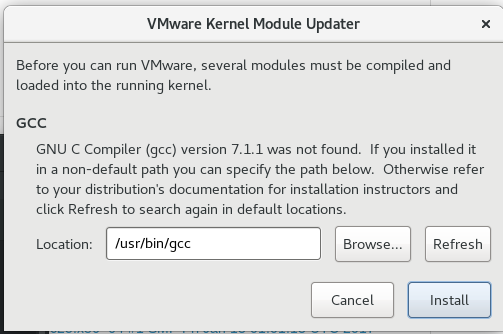
Now I am running Fedora26, want it to run a puppet training environment, no chance. It refuses to automatically compile the modules needed saying it cannot find a compatible gcc version, even though the exact version it says it cannot find is the default.

mark@vmhost3 ~]$ gcc --version
gcc (GCC) 7.1.1 20170622 (Red Hat 7.1.1-3)
Copyright (C) 2017 Free Software Foundation, Inc.
This is free software; see the source for copying conditions.  There is NO
warranty; not even for MERCHANTABILITY or FITNESS FOR A PARTICULAR PURPOSE.
[mark@vmhost3 ~]$ gcc -dumpversion
7

Trying to install the modules manually also gets an error

[root@vmhost3 ~]# vmware-modconfig --console --install-all
Failed to get gcc information.

Running make manually on vmmon and vmnet gets lots of compile errors.

root@vmhost3 vmware_work]# make -C vmmon-only
make: Entering directory '/var/tmp/vmware_work/vmmon-only'
Using kernel build system.
make -C /lib/modules/4.11.9-300.fc26.x86_64/build/include/.. SUBDIRS=$PWD SRCROOT=$PWD/. \
  MODULEBUILDDIR= modules
make[1]: Entering directory '/usr/src/kernels/4.11.9-300.fc26.x86_64'
  CC [M]  /var/tmp/vmware_work/vmmon-only/linux/driver.o
/var/tmp/vmware_work/vmmon-only/linux/driver.c:124:19: error: initialization from incompatible pointer type [-Werror=incompatible-pointer-types]
         .fault  = LinuxDriverFault
                   ^~~~~~~~~~~~~~~~
/var/tmp/vmware_work/vmmon-only/linux/driver.c:124:19: note: (near initialization for ‘vmuser_mops.fault’)
/var/tmp/vmware_work/vmmon-only/linux/driver.c: In function ‘cleanup_module’:
/var/tmp/vmware_work/vmmon-only/linux/driver.c:403:8: error: void value not ignored as it ought to be
    if (misc_deregister(&linuxState.misc)) {
        ^~~~~~~~~~~~~~~
At top level:
/var/tmp/vmware_work/vmmon-only/linux/driver.c:1332:1: warning: always_inline function might not be inlinable [-Wattributes]
 LinuxDriverSyncReadTSCs(uint64 *delta) // OUT: TSC max - TSC min
 ^~~~~~~~~~~~~~~~~~~~~~~
cc1: some warnings being treated as errors
make[2]: *** [scripts/Makefile.build:295: /var/tmp/vmware_work/vmmon-only/linux/driver.o] Error 1
make[1]: *** [Makefile:1496: _module_/var/tmp/vmware_work/vmmon-only] Error 2
make[1]: Leaving directory '/usr/src/kernels/4.11.9-300.fc26.x86_64'
make: *** [Makefile:120: vmmon.ko] Error 2
make: Leaving directory '/var/tmp/vmware_work/vmmon-only'

I don’t want to spend weeks trying to get it working, and all the forums google searched throw up day basically the same thing, if you upgrade your OS for any reason you have wasted your money purchasing VMWare.

Admittedly VirtualBox also needs the kernel driver(s) recompiled after OS upgrades, the main differences between the two being VirtualBox is free and the recompiled generally work… however I do not want yet another virtual machine environment installed on what should be a dedicated KVM machine.

Will try and eliminate VMWare Workstation from the machine alltogether and try and get the OVA machine image working under KVM as per this (external site) post KVM: Importing an OVA appliance. I have done this before with limited success depending on the complexity of the hardware configuration, but attempting this is preferable to installing yet another virtual machine tool.

I doubt I will use VMWare again; and I feel sorry for the sysadmins that have to support it. I have had a lot of pain getting OpenStack to do what I want, I consider VMWare is worse, my personal opinion of course :-).

Posted in Unix, Virtual Machines | Comments Off on Why do people use VMWare ?. It is a pain.

Puppetserver – my new interest

Why is the title puppetserver instead of puppet you ask, simply because as I am starting with puppet from scratch I have no interest in learning how to use the old “puppet-master” setup but will concentrate on the new puppetserver implementation… mainly because the old “puppet-master” setup is completely different as far as directory structures, software dependencies, configuration etc. so I see no point in learning how it used to be done in the old days (at least from google posts I have looked at they seem to be different, it may just be that I am using the puppetlabs packages and 3rd party re-packagers have moved the directry structures about; but I am using the puppetlabs packages so this post covers those).

As I have a smallish home lab comprised mainly of Fedora26 servers and VMs the “puppetserver” with the inbuilt webserver provides all I need for my own playing with how to use it.

My personal interest for using puppet is to enable my to update configuration files shared across all machines in one place and have the changed propogated. Happy to say it works perfectly for that purpose… the but I need to learn how to… is covered at the end of the post.

I have installed puppetserver onto a CentOS7 VM, the main reason for that is that there was no puppetserver available for F25 and I have only just (in the last week) upgraded all my Fedora servers from F25 to F26 and have not got around to seeinpuppetserver_centos7_2agents.yamlg if puppetserver is available for F26… plus of course I have been testing puppetserver installs/configurations on CentOS7 over the last few months to work out a suitable config for my use (refer to my earlier post on installing a puppetserver instance and puppet agent instance into openstack with a heat template if you want a repeatable trow-up/tear-down test environment, if you have a openstack test system of course).

Setup used was

  • I created my puppetserver puppet host in a new CentOS7 VM with only 2Gb of memory assigned, and changed the configuration for the java memory to 1Gb and the startup delay values as described in the heat template covered in the above post. Configured the VM to use a fixed ip in this case of course. Also using automatic signing of certificates as I have a lot of VMs to setup.
  • Created a “nrpe” configuration module so there was something to test with… the configuration is pasted later in the post
  • to avoid having to update the /etc/hosts file on all my VMs I created a complete hosts file on my two main vmhost servers, started dnsmasq, and updated all VMs to use those as the first two nameservers. And no it was not a lot of effort as the alternative would be updating the /etc/hosts file on all VM servers to have an entry for the “puppet” host anyway… so as I had to update all VMs anyway I chose to alter them to use dns to avoid any need for updating hosts files on VMs in the future
  • and one-by-one on the F26 VMs installed from the Fedora repositories with “yum -y install puppet”,”systemctl enable puppetagent”,”systemctl start puppetagent”
  • watched them register certificates and sync the nrpe commands I use onto each VM from the puppet host

As noted at the start of the post puppetserver and puppet-master use different configurations, including the directory structures (if posts found on google are anything to go by anyway… it may just be because I am using puppetlabs packages instead of the 3rd party distros). But I include a banner at the start of each file, for my reference also, so you know where these should go in a puppetserver install.

This is working to customise the nrpe commands across all my VMs, but see the what I still need to learn section below the code examples.

# ==================================================================
# /etc/puppetlabs/code/environments/production/modules/nrpe/manifests/init.pp
# ==================================================================
class nrpe {
   # install nrpe package
   package { 'nrpe':
     ensure => installed,
   }

   # install nagios plugins packages
   package { 'nagios-plugins-all':
     ensure => installed,
   }

   # replace the allowed_hosts line with out host list
   # note: file_line is from puppetlabs/stdlib (not a core module),
   #       so cannot use it, supply the entire file (Fedora, have to rethink CentOS deploys)
#   file_line { 'allowed_hosts':
#     path  => '/etc/nagios/nrpe.cfg',
#     line  => 'allowed_hosts=192.168.1.170,192.168.1.183,127.0.0.1',
#     match => '^allowed_hosts=127\.0\.0\.1*',
#   }
#
   # install a nrpe configuration file that allows connections from all both nagios hosts
   file { 'nrpe.cfg':                                # file resource name
       path => '/etc/nagios/nrpe.cfg',      # destination path
       ensure => file,
       owner => 'root',
       group => 'root',
       mode => '0644',
       source => 'puppet:///modules/nrpe/nrpe.cfg',  # specify location of file to be copied
     }

   # IMPORTANT NOTE ON FILES, PUPPET INSERTS A /files/ into the source URL
   # source => 'puppet:///modules/nrpe/md_check_bacula_client' 
   # is physically on puppetserver the below structure
   # /etc/puppetlabs/code/environments/production/modules/nrpe/files/md_check_bacula_client
   #
   # move on to ensuring all my custom nrpe scripts and commands exist
   file { 'md_check_bacula_client':                        
       path => '/usr/lib64/nagios/plugins/md_check_bacula_client',     
       ensure => file,
       owner => 'root',
       group => 'root',
       mode => '0644',
       source => 'puppet:///modules/nrpe/md_check_bacula_client' 
     }
   file { 'md_check_snort':                        
       path => '/usr/lib64/nagios/plugins/md_check_snort',
       ensure => file,
       owner => 'root',
       group => 'root',
       mode => '0644',
       source => 'puppet:///modules/nrpe/md_check_snort' 
     }
   file { 'md_check_tripwire':                        
       path => '/usr/lib64/nagios/plugins/md_check_tripwire',
       ensure => file,
       owner => 'root',
       group => 'root',
       mode => '0644',
       source => 'puppet:///modules/nrpe/md_check_tripwire' 
     }
   # ....... lots more commands .......
   #
   # nrpe additional commands now
   # note: the notify will endure the nrpe service is restarted to pick up
   #       changed when this file is modified
   file { 'nrpe_extra_commands':                        
       path => '/etc/nrpe.d/marks_extras.cfg',
       ensure => file,
       owner => 'root',
       group => 'root',
       mode => '0645',
       source => 'puppet:///modules/nrpe/marks_extras.cfg',
       notify  => Service['nrpe'],
     }

   # we can now ensure nrpe service is running
   service { 'nrpe':
     ensure => running,
   }
} # end nrpe class
# ==================================================================
# /etc/puppetlabs/code/environments/production/manifests/site.pp
# ==================================================================
# apply to all nodes without an explicit entry
node default {
   include nrpe
}
# override the defaults for server specific customisation
node 'nagios' {
   include nrpe
}

What I still need to learn

  • how to include facter information into a template file (hmm, did I answer my own question, template file) so I can push out config files that only differ by hostname vaules within the config files

Anyway I have downloaded the puppetlabs tutorial/training ISO to look at, always knew paying for a vmware workstation license would come in handy one day :-). But that seems to be more for puppet ‘enterprise’ training than the basic foundation components I need to learn but I will give it a go.

I think the puppet core components have the potential to keep me interested for a while.

Posted in Unix | Comments Off on Puppetserver – my new interest

Now whats up with Nagios these days ?

This post was going to be simply about how the only issue I had from upgrading all my core servers to F26 had no issues other than nagios. The title has been updated and the topic slightly changed due to packages suddenly disappearing from totally unrelated CentOS7 repos.

Anyway I upgraded all my F23/F24/F25 systems to F26 to have a nice standard system base again, made possible now the rpmfusion repos have “motion” available for F26 which blocked be from upgrading one of my VM host servers above F23 previously.

I used the dnf-plugin-system-upgrade method on all servers upgraded; although I had to use the –allowerasing option on two of them. The upgrades worked seamlessly and mysql_upgrade was only needed on the F23/F24 ones, the ones that were F25 reported the database was up to date when mysql_upgrade was run.

One issue identified was that after the upgrade apache had reverted back to using privateTmp directories again (reported by my nagios check for that when I finally got most of nagios working again).

Only one issue from the upgrades identified so far, Nagios and nrpe

The only major issue from the upgrades, which is still an issue, is that NRPE and NAGIOS no longer want to talk to each other.

After upgrading a nrpe client server nrpe logs were full of the messages “Error: Could not complete SSL handshake with 192.168.1.170: 1”, and no it was not an allowed_hosts issue, everything was working prior to the upgrade.

So I decided to upgrade all servers to F26 including the nagios server to see if that resolved the problem, and it did not resolve the problem but made the issues worse in that a few of the plugins I use stopped working as well.

Anyway there are lots of search hits on the SSL handshake problem, the root cause seems to be nrpe is built from an old version of openssl and on machines using later versions of openssl it is never going to work. The nagios forums provide the only solution, which is turning SSL off for nrpe. Which is a fair bit of work,

  • on every server running the nrpe client you must (1) “vi /usr/lib/systemd/system/nrpe.service” and insert a -n in the command to start the nrpe daemon, (2) “systemctl daemon-reload” to pick up the changes, (3) restart the nrpe service
  • on the nagios host(s) “vi /etc/nagios/objects/commands.cfg” and insert a -n into the check_nrpe command (note: if you blindly copied the commands.cfg.rpmnew over commands.cfg you will have to re-add the check_nrpe command as per the nrpe installation documentation (and any other commands you defined))

That had everything chatting to most hosts again with many of the checks running. But there is still the issue that some of the plugins just no longer work.

The ones that just broke are the ping check and current load complaining about missing arguments, and total processes which reports unable to read output. Nothing wrong with the nrpe or nagios configuration, the plugins just do not work. Examples of running them manually as root on machines with selinux permissive and “setenforce 0” (so not a security issue) are below.

[root@nagios objects]# /usr/lib64/nagios/plugins/check_ping
check_ping: Could not parse arguments
Usage:
check_ping -H  -w ,% -c ,%
 [-p packets] [-t timeout] [-4|-6]
[root@nagios objects]# /usr/lib64/nagios/plugins/check_ping -H 127.0.0.1 -w 100.0,20% -c 500.0,60% -p 5 -t 2 -4
CRITICAL - You need more args!!!
Could not open pipe: 
[root@vmhost3 nagios]# /usr/lib64/nagios/plugins/check_load 
check_load: Could not parse arguments
Usage:
check_load [-r] -w WLOAD1,WLOAD5,WLOAD15 -c CLOAD1,CLOAD5,CLOAD15
[root@vmhost3 nagios]# /usr/lib64/nagios/plugins/check_load -r -w .15,.10,.05 -c .30,.25,.20
CRITICAL - You need more args!!!
Error opening 
[root@vmhost3 nagios]# 
[root@vmhost3 nagios]# /usr/lib64/nagios/plugins/check_procs -w 150 -c 200
Unable to read output
[root@vmhost3 nagios]# /usr/lib64/nagios/plugins/check_procs 
Unable to read output

As they are supplied plugins they should just work, hopefully those issues get resolved by updates in the next 3-4 weeks, the check_ping appears to be critical, with it not working all hosts are marked down or unreachable… so I replaced that with my own command in the check_host_availability command to work around that in the meantime.

Second unresolved nagios issue

While all the Fedora26 servers are chatting OK the CentOS7 servers no longer accept connections from the F26 nagios/nrpe packages. Below is basic debugging from my nagios server

  • can ping a CentOS7 host from the F26 nagios server
  • cannot connect to port 5666 on a CentOS7 host from a F26 nagios server
  • can ssh to the CentOS7 host from the F26 nagios server, so the “no route” error message is misleading
  • can connect to port 5666 on the CentOS7 server from the CentOS7 server
  • and as the CentOS7 servers are just for running openstack components
    • firewalld is not running on the CentOS7 server, it is not a firewall problem
    • selinux is disabled on the CentOS7 servers, it is not a security problem
[mark@nagios ~]$ telnet 192.168.1.172 5666
Trying 192.168.1.172...
telnet: connect to address 192.168.1.172: No route to host
[mark@nagios ~]$ ping -c1 192.168.1.172
PING 192.168.1.172 (192.168.1.172) 56(84) bytes of data.
64 bytes from 192.168.1.172: icmp_seq=1 ttl=64 time=0.466 ms

--- 192.168.1.172 ping statistics ---
1 packets transmitted, 1 received, 0% packet loss, time 0ms
rtt min/avg/max/mdev = 0.466/0.466/0.466/0.000 ms
[mark@nagios ~]$ ssh root@192.168.1.172
root@192.168.1.172's password: 
Last login: Mon Jul 17 11:55:11 2017 from 192.168.1.170
[root@region1server1 ~]# netstat -an | grep 5666
tcp        0      0 0.0.0.0:5666            0.0.0.0:*               LISTEN     
tcp6       0      0 :::5666                 :::*                    LISTEN     
[root@region1server1 ~]# firewall-cmd --list-ports
FirewallD is not running
[root@region1server1 nagios]# telnet localhost 5666
Trying ::1...
Connected to localhost.
Escape character is '^]'.
Connection closed by foreign host.
[root@region1server1 nagios]# telnet 192.168.1.172 5666
Trying 192.168.1.172...
Connected to 192.168.1.172.
Escape character is '^]'.
Connection closed by foreign host.

Latest update is… on a fresh CentOS7 install for further testing

Yes I know that has nothing to do with a F26 upgrade, but pherhaps it indicates a bigger issue ?.
Found when I was testing a puppet agent run in a CentOS7 agent, nrpe and nagios-plugins-all are no longer in the CentOS7 repo !.

[root@agenttest ~]# yum search nrpe
Loaded plugins: fastestmirror
Loading mirror speeds from cached hostfile
 * base: mirror.xnet.co.nz
 * extras: mirror.xnet.co.nz
 * updates: mirror.xnet.co.nz
Warning: No matches found for: nrpe
No matches found
[root@agenttest ~]# yum search nagios-nrpe
Loaded plugins: fastestmirror
Loading mirror speeds from cached hostfile
 * base: mirror.xnet.co.nz
 * extras: mirror.xnet.co.nz
 * updates: mirror.xnet.co.nz
Warning: No matches found for: nagios-nrpe
No matches found
[root@agenttest ~]# yum provides nrpe
Loaded plugins: fastestmirror
Loading mirror speeds from cached hostfile
 * base: mirror.xnet.co.nz
 * extras: mirror.xnet.co.nz
 * updates: mirror.xnet.co.nz
base/7/x86_64/filelists_db                                                                         | 6.6 MB  00:00:35     
extras/7/x86_64/filelists_db                                                                       | 1.1 MB  00:00:05     
puppetlabs-pc1/x86_64/filelists_db                                                                 | 1.0 MB  00:00:06     
updates/7/x86_64/filelists_db                                                                      | 4.3 MB  00:00:19     
No matches found
[root@puppet nrpe]# yum provides /usr/sbin/nrpe
Loaded plugins: fastestmirror
Loading mirror speeds from cached hostfile
 * base: mirror.xnet.co.nz
 * extras: mirror.xnet.co.nz
 * updates: mirror.xnet.co.nz
No matches found
[root@puppet nrpe]#

The nrpe package (and most of the nagios ones) appear to have been removed from the CentOS7 repositories now !. Rechecked the machines I do have it installed on and it did come come from the CentOS repos.

root@region1server2 nagios]# rpm -qi nrpe
Name        : nrpe
Version     : 2.15
Release     : 4.el7
Architecture: x86_64
Install Date: Mon 17 Jul 2017 10:20:16 NZST
Group       : Applications/System
Size        : 294857
License     : GPLv2
Signature   : RSA/SHA1, Thu 23 Feb 2017 09:55:04 NZDT, Key ID f9b9fee7764429e6
Source RPM  : nrpe-2.15-4.el7.src.rpm
Build Date  : Sat 27 Dec 2014 08:42:09 NZDT
Build Host  : c1bg.rdu2.centos.org
Relocations : (not relocatable)
Packager    : CBS 
Vendor      : Centos
URL         : http://www.nagios.org
Summary     : Host/service/network monitoring agent for Nagios
Description :
Nrpe is a system daemon that will execute various Nagios plugins
locally on behalf of a remote (monitoring) host that uses the
check_nrpe plugin.  Various plugins that can be executed by the
daemon are available at:
http://sourceforge.net/projects/nagiosplug

This package provides the core agent.

No big deal you say, well it buggers my next post which was to be how I will be using puppet to keep all my nrpe plugins/commands/custom configs in sync across multiple hosts. Damn, will have to rebuild my testing heat stack to use a F25 test agent instead of a CentOS7 one. Followed by an oops good thing I was writing a post as when I deleted the running stack there went the config I was testing, fortunately its pasted in the next draft post :-).

Unless nagios has suddenly gone 100% commercial I guess the packages will be back in the repos fairly soon; until then I guess I can only automate (whether by heat_patterns, kickstart. or the new toy I am testing puppet) using fedora servers and repos as even if they are now buggy they will eventually be fixed (hopefully).

Posted in Unix | Comments Off on Now whats up with Nagios these days ?

Decided to finally have a look at “puppet”.

When I initially had issues with Puppet I also looked at “Chef” but my issues with Chef were that it needs a damn site more resources to run plus to download the main chef server component you have to go through a registration page… and while I have no issues with that in itself that is not something that can be automated… so in line with my philosophy for my home lab which is instances must be able to be thrown-up/torn-down on demand or discarded, Chef is in the discarded bucket for now.

Anyway, my initial issues with Puppet were that the repos seemed to be out of sync or shipping conflicting packages. I’m happy to say that has been resolved and installing Puppet from the repos is now a totally hands off experience for me so I will stick with that.

While I do not have enough servers of similar types to use it as a deployment tool for server builds I believe it could be useful for specific tasks, such as ensuring every server has the same set of nagios/nrpe monitoring scripts… rather my my rather ad-hoc method of remembering to push push out new scripts when nrpe reports they are missing :-).

There is a lot of walk throughs on setting up a puppet master server out on the web, mainly for Ubuntu but a few for CentOS as well.

As my setup is mainly Fedora based and I am only looking into it rather than commiting to it as a solution I decided to use a test environment easily able to be rebuilt as needed; in this case my OpenStack home lab environment.

My deployment is a throw-up/tear-down solution for testing (after all that is what cloud instances are for) in my OpenStack test lab using a simple heat template; allowing me to create all the servers with one openstack command and to delete all the servers simply by deleting the stack from the dashboard. The deployment heat template creates a “puppet” server and a “agenttest” server.

After deploying the heat pattern I have a working “puppet” host running puppetserver with the agenttest server registered with it. The agent can register as I configured the puppetserver to automatically accept agent cert registration requests so there is no need for any manual intervention to accept a certificate (as that would defeat the point of automatically deploying the stack in a hands off way using heat patterns).

[root@puppet ~]# puppet cert list --all
+ "agenttest.mdickinson.dyndns.org" (SHA256) 4D:23:9E:97:77:7C:13:4D:CA:00:42:3B:8F:1A:A6:AB:26:35:A5:B4:D0:FC:B0:A5:3C:08:A2:F1:E7:55:36:FA
+ "puppet.mdickinson.dyndns.org"    (SHA256) 71:84:87:19:DF:90:F7:52:14:67:F2:FE:FA:C1:0A:E4:1B:33:DC:27:E3:41:8B:0D:0D:0E:0D:AB:20:50:88:82 (alt names: "DNS:puppet", "DNS:puppet.mdickinson.dyndns.org")
[root@puppet ~]# 

If you want to use the heat pattern you will need to note

  • change the keypair to one you use
  • change the network names to ones you use
  • change the image name from CentOS-7-x86_64-GenericCloud-1704.qcow2 to whatever you called your copy of the CentOS7 cloud image
  • change the availability_zone used for both servers, most users would use the default “nova” but for my home lab I had to create a custom availability zone to ensure I always had resources available
  • the custom flavor centos7-puppet-min is a minimum of 3Gb memory, 3Gb swap, 8Gb root disk (centos7 cloud image needs 8Gb root disk)
  • the custom flavor centos7-min is a minimum of 1Gb memory, 3Gb swap, 8Gb root disk (centos7 cloud image needs 8Gb root disk)
  • in each instance definition I hard code the address of my external router (192.168.1.1) as an addition to the resolv.conf file so the instances can resolve internet addresses for the package installs, if you are not in a ‘home lab’ you will need to change that in both server instances

My OpenStack lab environment is currently OpenStack Ocata version, installed from the RDO repository via packstack with the main customisation being additional compute nodes. All the nodes are running CentOS7.

The heat template is run simply by (a user with heat_admin authority of course) “openstack stack create –template puppet_master_centos7.yaml puppet_testing” which will create a stack named puppet_testing with the following resources

  • create a custom security group to be used by the instances
  • create a “puppet” server on my tenant internal network and
    • install packages I always need for network troubleshooting
    • assign a password of “password” to root for troubleshooting from the console (bad I know)
    • install the puppetserver packages
    • make lots of customisations, including to automatically accept cert requests
    • start the puppetserver
    • assign a floating ip-address to the instance, also primarily for troubleshooting (for getting into it without the console)
  • create a “agentest” server on my tenant internal network and
    • install packages I always need for network troubleshooting
    • assign a password of “password” to root for troubleshooting from the console (bad I know)
    • install the puppet-agent packages
    • ensure the puppet-agent is running
    • change sshd configuration to allow root to login directly, also for troubleshooting so from the “puppet” instance I can login to the agent instance via the internal tenant network without having to copy ssh keys onto the puppet instance

And you have a running and working puppetserver instance to play with with running agent server to test rules against.

When you are done with it just use the dashboard Project/Orchestration/Stacks screen to delete the stack, and all instances and the decurity group will be deleted, and the floating ip released.

Anyway, the template

[root@region1server1 heat_stacks(keystone_mark)]# cat puppet_master_centos7.yaml
heat_template_version: 2016-10-14

description: >
  Install a puppet master server and agent server,
  Custom Flavor notes, CentOS7 cloud image needs a minimum 8Gb disk image for each instance,
  puppetserver instance needs at least 3Gb memory and 3Gb swap,
  agent needs 1Gb memory 2Gb swap,
  the floating ip on puppet server is not recomended but I find it usefull to get into the test stack quickly bypassing a normal tenant gateway server.

parameters:
  key_name:
    type: string
    label: Key Name
    description: Name of key-pair to be used for compute instance
    default: marks-keypair-ocata
  root_password:
    type: string
    label: Root User Password
    description: Password to be used for root user
    hidden: true
    default: password
    constraints:
      - length: { min: 6, max: 8 }
        description: Password length must be between 6 and 8 characters.
      - allowed_pattern: "[a-zA-Z0-9]+"
        description: Password must consist of characters and numbers only.
  net:
    description: name of network used to launch instance.
    type: string
    default: tenant-mark-10-0-3-0
  subnet:
    description: name of subnet within network used to launch instance.
    type: string
    default: tenant-mark-10-0-3-0-subnet1
  public_network:
    description: name of the public network to associate floating ip from.
    type: string
    default: ext-net-192-flat

resources:
  puppet-server:
    type: OS::Nova::Server
    properties:
      name: puppet
      key_name: { get_param: key_name }
      image: CentOS-7-x86_64-GenericCloud-1704.qcow2
      flavor: centos7-puppet-min
      security_groups: [{ get_resource: puppet_security_group }]
      availability_zone: compute-pool
      networks: 
        - network: { get_param: net }
      user_data: 
         str_replace:
            template: |
              #!/bin/bash
              echo "Customising system image..."
              # For troubleshooting use a known password for console login
              echo "$ROOTPSWD" | passwd root --stdin
              timedatectl set-timezone Pacific/Auckland
              wc_notify --data-binary '{"status": "SUCCESS"}'
              #
              echo "nameserver 192.168.1.1" >> /etc/resolv.conf
              sync
              yum -y install telnet iputils psmisc
              sync
              #
              # enable the puppetlabs repo and install puppetserver
              rpm -ivh https://yum.puppetlabs.com/puppetlabs-release-pc1-el-7.noarch.rpm
              yum -y install puppetserver
              #
              # In a VM with 3Gb memory and two cores the puppetserver takes a long
              # time to start and generate its key; the startup will fail and loop
              # trying to start and being killed by systemd forever unless the startup
              # timeout values are changed. They must be changed in two configuration
              # files as systemd will use the lowest of either value set.
              # Also change puppetserver memory allocation from 2Gb to 1Gb
              cp /etc/sysconfig/puppetserver /tmp/puppetserver_sysconfig
              cat /tmp/puppetserver_sysconfig | sed -e's/-Xms2g -Xmx2g/-Xms1g -Xmx1g/' | sed -e's/START_TIMEOUT=300/START_TIMEOUT=1200/' > /etc/sysconfig/puppetserver
              cp /usr/lib/systemd/system/puppetserver.service /tmp
              cat /tmp/puppetserver.service | sed -e's/TimeoutStartSec=300/TimeoutStartSec=1200/' > /usr/lib/systemd/system/puppetserver.service
              cp /etc/puppetlabs/puppetserver/conf.d/puppetserver.conf /tmp
              # there are issues with letting legacy auth remain defaulted to true
              cat /tmp/puppetserver.conf | sed -e's/#use-legacy-auth-conf: false/use-legacy-auth-conf: false/' > /etc/puppetlabs/puppetserver/conf.d/puppetserver.conf
              systemctl daemon-reload
              #
              # create an empty default manifest file
              touch /etc/puppetlabs/code/environments/production/manifests/site.pp
              #
              # try and resolve timeout issues
              # MID added, makes no difference but documented as making no change
              echo "# MID added" >> /etc/puppetlabs/puppet/puppet.conf
              echo "http_connect_timeout = 2m" >> /etc/puppetlabs/puppet/puppet.conf
              echo "http_read_timeout = 5h" >> /etc/puppetlabs/puppet/puppet.conf
              echo "filetimeout = 5m" >> /etc/puppetlabs/puppet/puppet.conf
              # Normally you would not autosign, but should make testing easier
              echo "autosign = true" >> /etc/puppetlabs/puppet/puppet.conf
              #
              # puppet command is not in path until logoff/logon, add for next three commands
              export PATH=$PATH:/opt/puppetlabs/bin/puppet
              puppet resource package hiera ensure=installed
              puppet resource package facter ensure=installed
              puppet resource package rubygem-json ensure=installed
              #
              # Start puppetserver, during startup it will generate its ssl cert
              systemctl enable puppetserver
              #
              # systemctl start puppetserver    WAIT, DO NOT START IT YET
              # KNOWN BUG: https://tickets.puppetlabs.com/browse/SERVER-248
              #            that there is no intention of fixing
              # If ipv6 is enabled puppet will only listen on ipv6... centOS7 enables
              # ipv6 be default, even if the interface network-scripts/ifcfg-xxx has
              # ipv6init="no". Disable ipv6 in order to use puppet if you have any
              # agents that use ipv4
              echo "net.ipv6.conf.all.disable_ipv6 = 1" >> /etc/sysctl.conf
              sysctl -p
              #
              # Now it should start OK
              systemctl start puppetserver
              #
              logger "End of puppetserver cloud init scripted install"
              echo "...end of install"
              exit 0
              # ... done
            params: 
              $ROOTPSWD: { get_param: root_password }
  floating_ip:
    type: OS::Neutron::FloatingIP
    properties:
      floating_network: {get_param: public_network}
  association:
    type: OS::Neutron::FloatingIPAssociation
    properties:
      floatingip_id: { get_resource: floating_ip }
      port_id: {get_attr: [puppet-server, addresses, {get_param: net}, 0, port]}

  puppet-agent-test:
    type: OS::Nova::Server
    properties:
      name: agenttest
      key_name: { get_param: key_name }
      image: CentOS-7-x86_64-GenericCloud-1704.qcow2
      flavor: centos7-min
      security_groups: [{ get_resource: puppet_security_group }]
      availability_zone: compute-pool
      networks: 
        - network: { get_param: net }
      user_data: 
         str_replace:
            template: |
              #!/bin/bash
              echo "Customising system image..."
              # For troubleshooting use a known password for console login
              echo "$ROOTPSWD" | passwd root --stdin
              timedatectl set-timezone Pacific/Auckland
              wc_notify --data-binary '{"status": "SUCCESS"}'
              #
              # Servers with only private ips I allow password logins
              # (or all the ssh keys would have to be copied to all servers
              # in the private network that might want to logon to this server).
              cd /etc/ssh
              cat sshd_config | sed -e 's/PasswordAuthentication no/PasswordAuthentication yes/' > sshd_config.new
              mv sshd_config sshd_config.old
              mv sshd_config.new sshd_config
              chmod 644 sshd_config
              service sshd restart
              # Additional nameserver for resolving external download sites on first install boot
              echo "nameserver 192.168.1.1" >> /etc/resolv.conf
              sync
              yum -y install telnet iputils psmisc
              sync
              #
              # It takes along time for the puppet master to install packages and configure itself.
              # As soon as the agent starts it will send a cert request to the puppet server,
              # we must wait until the 'puppet' server has been fully configured as part of the stack build
              # before we start the agent that will immediately try to connect to it to elimate 
              # the puppet server being available as the cause of the idletimeout errors seen in
              # puppet server logs.
              echo "*** Agent startup is delaying for 20mins to allow puppet master to fully configure ***"
              logger "*** Agent startup is delaying for 20mins to allow puppet master to fully configure ***"
              sleep 20m
              #
              # Then install the puppet agent packages
              rpm -ivh https://yum.puppetlabs.com/puppetlabs-release-pc1-el-7.noarch.rpm
              yum -y install puppet-agent
              # to resolve timeout issues
              echo "http_read_timeout = 5h" >> /etc/puppetlabs/puppet/puppet.conf
              /opt/puppetlabs/bin/puppet resource service puppet ensure=running enable=true
              #
              echo "use 'puppet cert list' and 'puppet cert sign' on the puppet server to register this agent"
              echo "this agent will have generated the cert request to the pupper server when the agent started."
              echo "...end of install"
              exit 0
              # ... done
            params: 
              $ROOTPSWD: { get_param: root_password }

  puppet_security_group:
      type: OS::Neutron::SecurityGroup
      properties:
        description: Ports needed for a puppet master server.
        name: puppet-security-group
        rules: [
          {remote_ip_prefix: 0.0.0.0/0,
          protocol: tcp,
          port_range_min: 22,
          port_range_max: 22},
          {remote_ip_prefix: 0.0.0.0/0,
          protocol: tcp,
          port_range_min: 80,
          port_range_max: 80},
          {remote_ip_prefix: 0.0.0.0/0,
          protocol: tcp,
          port_range_min: 443,
          port_range_max: 443},
          {remote_ip_prefix: 0.0.0.0/0,
          protocol: tcp,
          port_range_min: 8140,
          port_range_max: 8140},
          {remote_ip_prefix: 0.0.0.0/0,
          protocol: icmp}]

outputs:
  instance_private_ip_puppet:
    description: Private IP address of puppet server
    value: { get_attr: [puppet-server, networks, {get_param: net}, 0] }
  instance_public_ip_puppet:
    description: Public IP address of agent server
    value: { get_attr: [puppet-server, networks, {get_param: net}, 1] }
  instance_keypair:
    description: SSH Key-Pair to be used to access the instances
    value: { get_param: key_name }
  instance_rootpw:
    description: Root password for both servers
    value: { get_param: root_password }
  instance_private_ip_testagent:
    description: Private IP address of puppetagent test server
    value: { get_attr: [puppet-agent-test, networks, {get_param: net}, 0] }
Posted in OpenStack, Unix | Comments Off on Decided to finally have a look at “puppet”.

OpenStack Ocata install from the RDO repositories

Why a fresh install instead of an upgrade ?

I gave up on trying to upgrade from Newton to Ocata using the RDO repositories.

The upgrade instructions have now been updated for the Ocata release in the RDO documentation web pages but it is anybodies guess on what order they need to be performed in. While they have a special section on upgrading nova to use the placement service it doesn’t work in the order on the webpage, some of the commands need openstack running but the upgrade steps are after openstack is shutdown. I tried to muddle through them and ended up with a unusable system again.

Interestingly the placement database on a fresh install is nova_cell0. The database upgrade scripts still want a nova_api_cell0. Which is only interesting who read my posts on my attempts to upgrade where the available documentation and upgrade scripts had completely different ideas about what databases were needed.

Anyway, while upgrade from mitaka to newton was easy, from newton to ocata (after weeks of trying) has been put in the waste of time basket.

Anyway, a complete fresh install to Ocata

Now that Ocata is available as a simple packstack install I decided to install my environment from scratch (after using glance image-download to save all my images of course).

I created two new CentOS7 VMs using the minimum install option, and the only issues encountered in preparing the environment were

  • openvswitch is not in the CentOS7 repositories, I had to add the RDO repository and install openvswitch before I could create the br-ex interface needed for using openvswitch; but done

Use packstack to create an answers file to edit, only changed

  • set the admin password to password :-)
  • set the use heat flag to “y” as I need heat
  • added my second VM as a second compute host

The packstack install file using the answers file failed on rabbitmq starting; did a –allinone packstack install, same error. A quick search on google and this is expected… you must add the server names into the /etc/hosts files on both the servers if they are not in dns as the rabbitmq install wants to lookup the ip-addresses (I didn’t find this in the RDO site, just posts from others who had the same issue).

After adding the server names into the /etc/hosts files running packstack created the environment seemingly correctly, I could logon to the dashboard and had two compute nodes under the hypervisor tabs.

The remaining issues after it apparently installed correctly the I had to resolve were

  • the cirros image installed by default fails to install, stays in queueing state, it had to be deleted from the CLI as the dashboard could not do it (google searches show this hiccup in the install is common). I only noticed it because I forgot to change “y” to “n” to download it as I didn’t want it anyway :-)
  • metadata service is unreachable from instances, another known issue I have hit before with a packstack install. On all compute hosts edit /etc/neutron/dhcpagent.ini and set “force_metadata = true”. Failure to do so will prevent ssh keys and configuration scripts (well all metatdata) from being applied to instances… meaning you have no chance of logging onto them
  • console access only works to the controller node, console access to instances on additional compute nodes cannot connect. To resolve on all additional compute nodes edit nova.conf and
    • in the [vnc] section add the missing line “vncproxy_url = http://nnn.nnn.nnn.nnn:6080” where nnn.nnn.nnn.nnn is replaced by the ip-address of your controller node
    • check novncproxy_base_url=http://nnn.nnn.nnn.nnn:6080/vnc_auto.html
    • check vncserver_listen is set to the ip-address of your compute node and not set to 0.0.0.0
    • and for the vncserver_proxyclient_address use the ip-address of the compute node, not the FQDN

    and you then have dashboard console access to the additional compute nodes

  • unable to get external networking configured using a flat network, the neutron l3-agent.log showed it was trying to create an entry that already existed. Resolution: delete all the demo networks that were provisioned and then adding the external flat network (so assumption is only one flat network permitted per bridge ?) and we are in business
  • And damn security rules. With tcpv4 ICMP allow all inbound and outbound, tcpv4 TCP allow all outbound, tcpv4 port 22 allowed inbound (all normal you would think) an instance cannot ping anything at all by DNS name.
    The only resolution I found for this is when creating a custom security group do not delete the default added egress ipv6 any and ipv4 any, as deleting them and adding back in an ipv4 egress for all port ranges does stop dns lookups (and probably breaks a lot more things as well). So leave the defaults and just add ingress rules as needed.

And finally after a few days of trawling through logs and living on google I have an Ocata system that… well honestly as a user I cannot see much difference in usage since Newton, which I guess is a good thing as a user.
And being on the latest means with luck I may be able to upgrade to the next release when it is available :-).

Posted in OpenStack, Unix | Comments Off on OpenStack Ocata install from the RDO repositories

Using LUKS to create an encrypted disk file

It has been a while since I posted about the wonderful LUKS encryption tool. I’m sure all Linux users have encrypted disks and I have already posted about using it to encrypt external devices (all my external disks and USB keys are encrypted, as should all yours be).

The history behind this post is way back in the dark ages when I used both windoze and linux machines I used the windoze third party TrueCrypt utility for encrypted volumes, there was/is a 3rd party ‘truecrypt’ program (that I must have installed from source as rpm -qf shows it is not part of a rpm package); which worked on linux to also be able to use those encrypted volumes… so momentum kept me using that method. Anyway, up until it stopped working on the more recent versions of Fedora as old obsolete library files were removed from the distros.

As I don’t actually use windoze anymore I created a LUKS volume and copied the data to that, and got rid of the TrueCrypt one… but it did make me realise I have not actually posted on using LUKS to encrypt virtual volumes… by that I do not mean all the fancy disk formats used by virtual machines, but a simple flat file on disk.

One little point to note, this may all need to be done as root simply because luksOpen needs to create a device entry under /dev/mapper which I would hope is restricted to root. Admitedly I have not tried using a non-root user simply because if your users have encrypted volumes lying about the place that are not documented you should squash them.

It is simple, as I was replacing a 200Mb truecrypt volume with a 200Mb LUKS one this is all that is needed…

Create a disk file as a LUKS encrypted volume

  • create a diskfile of 200Mb to use as the encrypted volume
  • luksFormat: format it as a LUKS device/file, and set the encryption password
  • luksOpen: create the device entry for it, format the device with a ext2 filesystem
  • luksClose: remove the device entry; it is now an encrypted disk file

And the log of the above steps

[root@phoenix posts]# dd if=/dev/zero of=normaldiskfile.dat bs=1024000 count=200
200+0 records in
200+0 records out
204800000 bytes (205 MB) copied, 3.86504 s, 53.0 MB/s
[root@phoenix posts]# cryptsetup luksFormat normaldiskfile.dat

WARNING!
========
This will overwrite data on bkpfiles.dat irrevocably.

Are you sure? (Type uppercase yes): YES
Enter LUKS passphrase: yourpassphrase
Verify passphrase: yourpassphrase
[root@phoenix posts]# cryptsetup luksOpen normaldiskfile.dat myluksdisk
Enter passphrase for /home/mark/posts/normaldiskfile.dat: 
[root@phoenix posts]# mkfs -t ext2 /dev/mapper/myluksdisk
mke2fs 1.42.3 (14-May-2012)
Filesystem label=
OS type: Linux
Block size=1024 (log=0)
Fragment size=1024 (log=0)
Stride=0 blocks, Stripe width=0 blocks
49600 inodes, 197952 blocks
9897 blocks (5.00%) reserved for the super user
First data block=1
Maximum filesystem blocks=67371008
25 block groups
8192 blocks per group, 8192 fragments per group
1984 inodes per group
Superblock backups stored on blocks: 
	8193, 24577, 40961, 57345, 73729

Allocating group tables: done                            
Writing inode tables: done                            
Writing superblocks and filesystem accounting information: done 

[root@phoenix posts]# cryptsetup luksClose myluksdisk

Use the above disk file as a disk (mounted volume)

  • luksOpen: create the device entry
  • mount the device on a mount point, generally requires root access
  • happily use it
  • when done umount it and luksClose it

With the above example

[root@phoenix posts]# mkdir /mnt/newvol
[root@phoenix posts]# cryptsetup luksOpen normaldiskfile.dat myluksdisk
Enter passphrase for /home/mark/posts/normaldiskfile.dat:
[root@phoenix posts]# mount /dev/mapper/myluksdisk /mnt/newvol
[root@phoenix posts]# df -k /mnt/newvol
Filesystem             1K-blocks  Used Available Use% Mounted on
/dev/mapper/myluksdisk    191689  1550    180242   1% /mnt/newvol
[root@phoenix posts]# ls /mnt/newvol
lost+found
[root@phoenix posts]# umount /mnt/newvol
[root@phoenix posts]# cryptsetup luksClose myluksdisk
Posted in Unix | Comments Off on Using LUKS to create an encrypted disk file

OpenStack – I am stuck on Newton for now

Issues with upgrading from Newton to Ocata have made me hold off upgrading to Ocata, I did make a few attempts.

Attempt One

After a normal upgrade from Newton to Ocata there were errors in the logs saying the placement service was optional in Newton but required in Ocata… and should have been installed in Newton before an upgrade was attempted. And while login to Horizon dashboard worked attempting to display pretty much anything using it failed.

Found a web post on setting that up so installed the placement package, configured it, added the service, added the endpoints etc… and eventually eliminated all the errors in the logs. Same issues with horizon.

The placement database required and initialised was nova_api_cell0.

As it still didn’t fix the issues with the horizon web interface reverted back and tried…

Attempt Two

Reverted back to the backed-up Newton system (don’t you just love VMs). And installed the placement service there before performing the upgrade.

The placement database required and initialised was nova_cell0.

Upgraded to Ocata and got the same errors for the placement service not being configured correctly. Running the database migration/upgrade scripts gave the error that the database was still missing… The nova_api sync step failed again because of a missing database, you guessed it, Ocata needs the database nova_api_cell0 not the nova_cell0 used by Newton… so had to recreate that database and run the simple cell creation script to populate that database.

So now I had two new databases both containing the same tables, was it safe to delete the first ?.

Anyway I had the same issues with Horizon not being able to display anything usefull. Dropped those VMs.

Attempt Three

Reverted back to the Newton VMs with no placement service installed… Ok I was lazy and did not want to build a new empty set of VMs for what may be a pointless exercise.

I stopped all openstack services and dropped all mariadb tables used by openstack. Changed the repository to the RDO Ocata one and did a fresh packstack install. The openstack mariadb databases were created, but none for the placement service nor was placement installed. However I cannot remember if I updated packstack itself before re-running packstack, so my bad… will have to find time to test a all-in-one on a fresh VM when I find the time.

Summary, why I stay on Newton for now

  • in “attempt one” I did spend days customising the “*rpmnew” configuration files to try and get my configuration ported across and the [placement_database] section in nova.conf for Newton does not exist in the rpmnew file installed for Ocata, lack of info on why or what it defaults to
  • direct upgrade to Ocata has error messages saying placement should be configured on Newton first… which is a waste of time as Newton and Ocata require different database names, so don’t bother getting it working in Newton all you have to so a lot of rework
  • and the big issue, is that the horizon web interface is unable to display anything useful; it cannot even display active hypervisors/compute-nodes which I assume means it cannot deploy instances onto them either… that is a show stopper. It may simply be a case of the authorisation URLs changing from V2 to V3 but as well as configuration file changes it would require manual deletion/recreation of endpoints, and I cannot find any documentation on the changes needed (the commands to delete add endpoints are of course documented as part of the standard documentation; it is the names/uri’s/url’s that need to be created for Ocata that are impossible to find)

Next steps… upgrade attempts on hold

The main reason I have put on hold more attempts to upgrade is that I need a working environment so cannot keep trashing my lab machine.

I need it to play with a stack installing puppet server and a couple of agent servers to see if it can be of any use to me. For server “application” build I do not think puppet is likely to be of much use to me as all my VMs and instances are single purpose; but for server “management” it might be of use (ie: making sure all servers with agents have the same nrpe custom check scripts propagated to them, all servers have a bacula-fd service configured and running etc.), but that will be a different post as my “servers” run a range of different operating systems and I have a lot of reading to do on how agents provide ‘facts’ to allow it all to hang together… but I have put on hold breaking my lab environment for now.

And something totally unrelated to the post. Neither the horizon interface or command line interfaces for resizing instances work for me in Newton. And after a resize operation fails the instance has a rubbish flavor id (an id that does not match any existing flavor). OK I should have sized the instance correctly in the first place and didn’t, but there appear to be placeholder commands that partially complete a task and leave a mess to clean up… but as cleaning up helps understand some of the underlying activities that could be considered a learning bonus.

Posted in OpenStack | Comments Off on OpenStack – I am stuck on Newton for now